
Blog content used to cost agencies $2,000 to $5,000 per month. Freelance writers charge $100 to $500 per article. For startups and solo founders, that math does not work. Claude Blog changes the equation entirely. It is free, open-source, and runs in your terminal.
This guide walks you through installing Claude Blog, generating your first post, understanding the 4-agent pipeline, choosing the right template, and scoring your content for quality. By the end, you will have a complete workflow for producing SEO-optimized blog posts without spending a dollar on software.
What is Claude Blog?
Claude Blog is an open-source blog writing skill for Claude Code. Version 2.1.1 uses 31 sub-skills, 5 AI agents, and 12 adaptable content templates to create, review, and improve posts from your terminal. There is no browser dashboard, monthly fee, or usage cap in the skill itself.
The tool handles the entire content creation pipeline: research, outlining, drafting, SEO optimization, AI citation optimization, image generation, and quality scoring. It outputs standard Markdown or HTML that works with any CMS, including WordPress, Ghost, Hugo, Jekyll, and Astro.
You can explore the full skill documentation at /skills/blog-write.
Installation (3 steps)
Getting Claude Blog running takes under two minutes. You need Python 3.11+, Claude Code CLI, and a terminal.
Step 1: Clone the repository
git clone --depth 1 https://github.com/AgriciDaniel/claude-blog.git
Step 2: Run the installer
bash claude-blog/install.sh
The installer copies the skill files to your Claude Code configuration directory and sets up the required file structure. No additional dependencies to install.
Step 3: Verify installation
/blog help
If you see the command list with all 16 available commands, you are ready to write your first post.
Your first post
The simplest way to generate a blog post is the /blog write command followed by your topic:
/blog write "how to optimize landing pages for conversions"
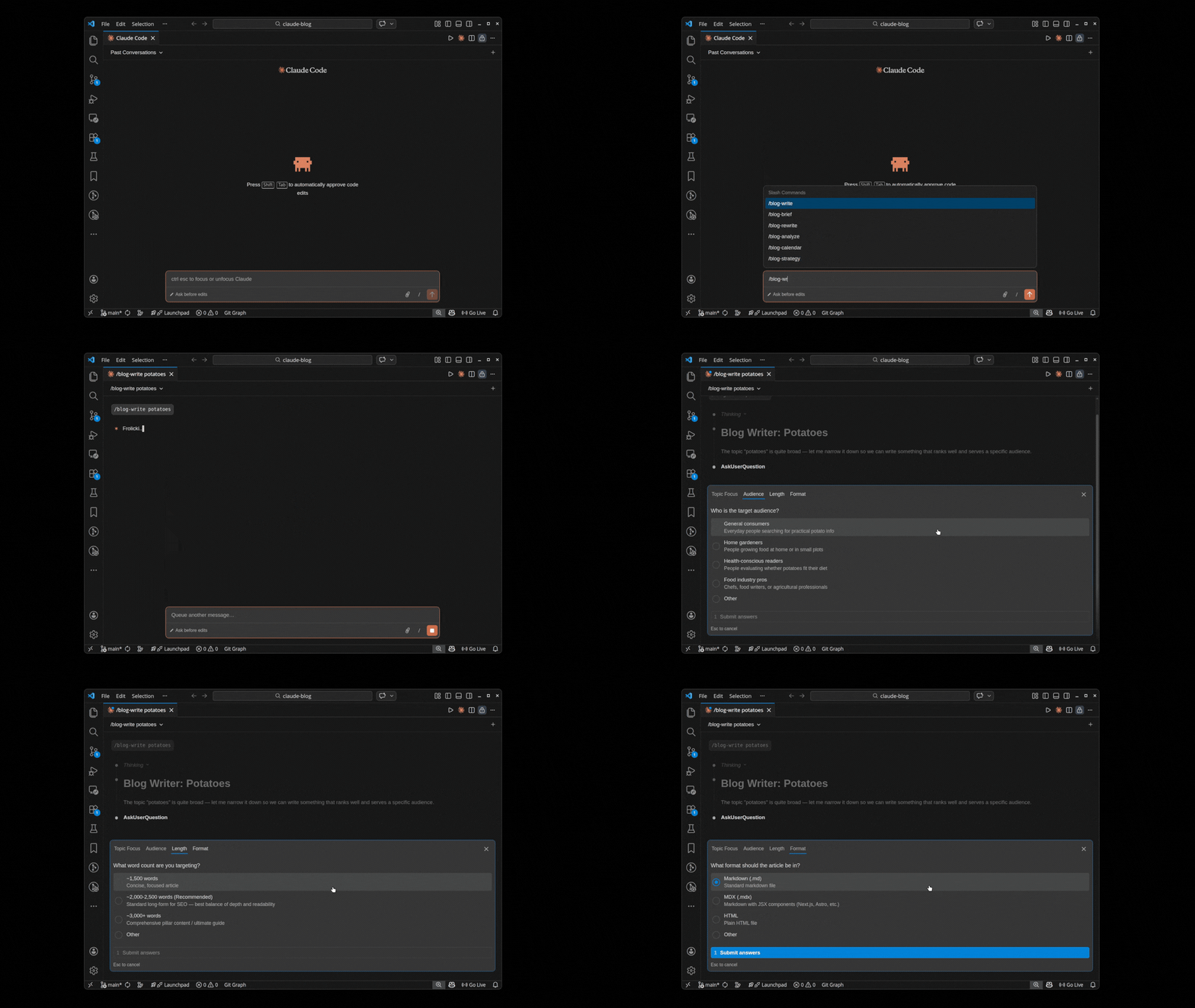
Claude Blog will analyze the topic, select the best template, run the 4-agent pipeline, and output a complete, SEO-optimized article. The default output is Markdown, but you can specify HTML with the format flag.
The entire process takes 2 to 4 minutes for a 2,000-word article. The output includes a title, meta description, heading structure, internal link suggestions, and a quality score.
The 4-agent pipeline
Claude Blog does not generate content in a single pass. It uses four specialized AI agents that work sequentially, each refining the output of the previous agent. This multi-agent approach produces significantly better results than a single prompt.
Agent 1: Research Agent
The Research Agent analyzes your topic, identifies the target keyword, researches competing content, and gathers supporting data points. It determines the optimal word count, heading structure, and content angle based on what is currently ranking for the topic.
Agent 2: Outline Agent
The Outline Agent takes the research output and creates a detailed content outline. It structures the article with H2 and H3 headings, assigns word counts to each section, identifies where to place statistics, examples, and calls to action, and determines the logical flow of the argument.
Agent 3: Writing Agent
The Writing Agent generates the full article text based on the outline. It writes each section with the specified word count, incorporates the research data, and follows the selected template structure. It also generates the meta title, meta description, and Open Graph tags.
Agent 4: Optimization Agent
The Optimization Agent reviews purpose fit, source fidelity, factual support, descriptive metadata, logical headings, contextual links, crawlability, and AI readiness. Style signals provide editing context but do not act as AI-authorship tests or blocking thresholds.
Choosing a template
Claude Blog includes 12 content templates, each designed for a specific content type. The default behavior auto-selects the best template based on your topic, but you can specify one manually:
/blog write "topic" --template comparison
Here are all 12 templates with brief descriptions:
- How-to - Step-by-step instructional guides with numbered processes
- Listicle - Numbered lists of items, tips, tools, or resources
- Comparison - Side-by-side analysis of two or more products or approaches
- Case study - Real-world examples with data, process, and results
- Pillar page - Comprehensive topic hubs linking to related subtopic articles
- News/trend - Timely analysis of industry developments and emerging trends
- Opinion/thought leadership - Expert perspectives backed by data and experience
- Product review - In-depth analysis of a product with pros, cons, and verdict
- FAQ/Q&A - Question-and-answer format targeting featured snippets
- Tutorial - Technical walkthroughs with code examples and screenshots
- Resource roundup - Curated collections of tools, links, or references
- Data-driven - Research-heavy articles built around statistics and analysis
For a detailed breakdown of each template, see the templates guide.
Scoring your post
After generating a post, run /blog analyze to score it across 5 weighted categories:
/blog analyze path/to/your-post.md
| Category | Weight | What it measures |
|---|---|---|
| Content Quality | 30% | Depth, accuracy, readability, structure |
| SEO | 25% | Title tags, meta, headings, keywords, links |
| E-E-A-T | 15% | Experience, expertise, authoritativeness, trust |
| Technical | 15% | Schema, canonical, OG tags, sitemap inclusion |
| AI Citation | 15% | Citability, passage structure, GEO readiness |
The scoring system outputs a 0-100 score with specific improvement recommendations. Posts scoring above 80 are considered publication-ready. Posts below 60 need significant revision.
Optimizing for AI citations
Claude Blog includes built-in GEO (Generative Engine Optimization) support through the /blog geo command. This analyzes your content for AI citation readiness across Google AI Overviews, ChatGPT, Perplexity, and Bing Copilot.
The GEO optimization focuses on passage-level citability, structural readability, and entity clarity. It identifies passages that are well-structured for AI extraction and flags sections that need restructuring. You can read more about this at /skills/blog-geo.
Integration with Claude SEO
Claude Blog works seamlessly with Claude SEO, the companion AI SEO audit skill. While Claude Blog handles content creation, Claude SEO handles site-wide technical SEO audits, schema markup generation, and performance analysis.
A typical workflow looks like this:
- Run
/seo auditon your site to identify content gaps - Use
/blog writeto generate articles targeting those gaps - Score the output with
/blog analyze - Publish, then re-run
/seo auditto verify improvements
Both tools are free, open-source, and MIT licensed. Together, they provide a complete content and SEO pipeline that costs nothing.